Dr. Vitak!

I am very bad with updates, as you can see, but here’s a big one. On December 14, 2012, I successfully defended my dissertation! Woo! I’m finishing final edits this week and will submit to the grad school shortly.

I also just wrapped up my first semester as an assistant professor at the iSchool at Maryland; recently published my first solo-authored article in JOBEM; and have three articles coming in CSCW this February. Busy times I tell you!

Here’s the abstract for my dissertation:

Arguably, the technical features of social network sites simplify the process of maintaining and interacting with hundreds of social connections. At the same time, however, these sites’ affordances—namely the visibility and persistence of content and the articulation of those connections (e.g., through a “Friend List”)—raise new questions about how individuals engage in relationship maintenance with various types of ties. This dissertation seeks to expand our understanding of relationship maintenance processes to account for the unique affordances of these communication technologies through a survey of adult Facebook users (N=407). First, through exploratory factor analysis, it establishes a set of Facebook relationship maintenance strategies that reflect existing theory and measures while accounting for the affordances of social media. Next, through nested OLS regressions, it tests whether engagement in these strategies with a randomly selected Facebook Friend predicts three relational outcomes: relational closeness, relational satisfaction, and access to social provisions. Third, it tests whether engagement in these strategies is associated with perceptions that using Facebook positively impacts their perceived relational closeness and relational stability with that Friend, while controlling for existing levels of relational closeness. Findings indicate main effects for all four relationship maintenance strategies on perceptions of Facebook’s impact on relational closeness and relational stability, as well as interaction effects between existing relational closeness and multiple strategies in predicting these two outcomes, such that weaker ties who engage in these strategies view the site as having a more positive impact on their relationship than stronger ties. Subsequent analyses identify additional differences between those who primarily rely on Facebook to communicate with that Friend and those who do not, as well as those who are geographically distant from each other versus those who live nearby, while controlling for existing relational closeness. This study contributes to the extant literature on computer-mediated communication and relationship maintenance by extending our understanding of how individuals interact through mediated channels and the role that newer technologies like social network sites play in managing a wide range of relationships, especially weaker ties who are more likely to rely on social media to keep their relationship in existence.

Presentation at iConference

This week I’m in Toronto, ON at the iConference. I’m presenting a small study done with Cliff Lampe, Rebecca Gray, and Nicole Ellison on how MSU employees balance their professional and personal lives on Facebook.

Link to the paper [pdf]

Full citation: Vitak, J., Lampe, C., Ellison, N., & Gray, R. (2012). “Why won’t you be my Facebook Friend?”: Strategies for dealing with context collapse in the workplace. In Proceedings of the 7th Annual iConference (pp. 555-557). New York: ACM. doi: 10.1145/2132176.2132286

Presentation on Social Media in Higher Education

This afternoon, Nicole Ellison and I presented some of our research on the use of social media in higher education, discussing results from three studies (two of which I have worked on) at the Instructional Technology Brown Bag Seminar Series, sponsored by MSU Libraries, Computing, and Technology and the MSU College of Natural Science. The presentation was video recorded and can be viewed here.

More information about the seminar series can be found here.

MSU Spartan Saga: What My MSU Education Means to Me

Recently, I was interviewed by representatives from the College of Communication Arts & Sciences regarding my experiences as a PhD student at MSU and what the university–and my program, Media & Information Studies–mean to me. It was a fun experience and helped me think about how much I’ve grown as a scholar and academic in the last 3+ years, and how well my experiences here have prepared me for the job market. I’ve included a link to the longer edited version below.

Teaching Social Media: One Week In!

I’ve just wrapped up my first full week of teaching my new class, Social Media in Society, and I have to admit I’m pretty excited with how it has progressed so far. This is a 400-level undergraduate class (see syllabus here), so I’ve structured it to be focused less on me lecturing and more on class interactions, and so far the students have exceeded my expectations. This is my area of expertise, so I’m not surprised how much I’m getting into the lesson preps, but social media is also so important in college students’ daily lives, that I’m too not surprised that they have many opinions. I’m just glad so many are voicing those opinions! Next week is going to be a fun week as we talk about online identities. Tuesday, I’m going to spend a fair amount of time talking about the nymwars and some of the fallout from Google+’s real-name policies. There’s been some great posts so far on this topic by danah boyd, Alice Marwick, Bernie Hogan, and others. There are so many great questions when thinking about the benefits and potential problems of being fully identifiable online; I’m especially interested to hear opinions from people who grew up in the Facebook age. For them, they’ve always had their real names associated with their online identity, at least in one location (which is probably the one they use the most).

This week, the most interesting thing to emerge from our class discussions is an obvious generation gap in terms of how we perceive email as a communication medium. Across the board, the students in the class saw email as communication for older people; it is slower, more formal and less social than other forms of communication like sending a text or posting on someone’s Facebook Wall. They associate email with work; one student said his immediate thought when he gets emails from certain people is, “what did I do wrong?” Meanwhile, I check my email every five minutes, send and receive several dozen emails every day, and can’t imagine communicating without email as a prime player in my communication repertoire.

I’m trying to incorporate social media into the class, although I’m already finding it difficult to successfully do without making use of a specific social media site a requirement. For example, about 2/3 of the class says they have a Twitter account so I’ve begun tweeting about the class with the hashtag #tc401; I’ve also encouraged them to tweet in and/or outside of class with questions. So far, it hasn’t caught on, but I’m hoping a quick walkthrough on Tuesday will pique their interest. As a class, we’re also trying an experiment involving Twitter: we’re creating a Twitter account and seeing how many followers we can get by the end of the semester. The class will make all decisions regarding the handle, image, description, and tweets. I really hope the class stays interested in this so we can see it through; they’ve already come up with a great concept for the account.

In other news, research continues to move forward, with work happening on my dissertation, a CHI paper, an iConference poster, and two journal articles.

Facebook’s “Circles”: How to create and use the Friend List feature

UPDATE (4/20/13): As this post has been receiving a lot of traffic in recent months and Facebook has changed the procedure through which to create and manage Friend Lists since this post was originally written (09/11), I’ve decided to update the post to reflect those changes. Most of these changes are in the steps users need to take to create a List.

******

When Google+ launched two months ago, people went on and on about how amazing the Circles feature was, as if it was the coolest feature since sliced bread. Meanwhile, I grumbled (to myself and on Twitter and probably to anyone who was willing to listen to my grumbling) about the fact that Facebook had, in fact, rolled out this feature at least two years prior, and probably much earlier than that. The problem is that people (1) don’t know about Friend Lists, and (2) Friend Lists require a fair amount of fixed costs in terms of creating these Lists. For G+ users, on the other hand, they were able to throw all new contacts into appropriate Circles as soon as they added them to their network. It is worth noting that Facebook has made this process much, much easier in the last year or so, but the feature is somewhat buried in the site and Facebook has done little to promote the feature, even in the wake of G+’s launch in June.

Facebook has made a recent change, however, that you may have noticed. On your desktop or laptop, check out your News Feed and look below a status update, where you have the option to Like or Comment on a Friend’s post. You should now see one of these icons:

public update

The top icon (the cogwheel) informs you that this post is shared with a Custom List. This could mean that the user has merely placed one or more Friends on a Limited Profile, or it could mean that you are on a Friend List that the user has created. The second icon (the silhouette of two people) means that the post was shared with all of that user’s friends. The third icon (a globe) means the post was shared publicly, meaning anyone can see it.

This is most likely a response to G+, which tells you whether posts are public (i.e., shared with anyone who visits the page), viewable by extended circles (think friends of friends), or Limited (this could be everyone the individual has placed in a circle or specific circles). G+ even tells you who those people are.

Facebook isn’t telling you who else can see those posts, only if they are going to everyone or some subset of their network. That said, this is once again making me question why Facebook does not feature Lists more prominently, especially if Circles is being used as a point of differentiation between the two sites. I know some people are using Lists–in my prelim research (conducted in April 2011), I asked participants (who were domestic grad students at MSU), “Have you created “Friend Lists” so you can post updates just to a subset of your Facebook Friends?” and 17% responded that they had. But I think more people would use Lists if they knew how, so I have finally decided to present a step-by-step walkthrough of the process for those who may not know.

Why would I want to post an update to a List?

Think if there are times when you wanted to post something to Facebook but stopped yourself because you thought, “I shouldn’t share that because Person X would see it and might not like it” or “I shouldn’t share this because it would only be relevant to a few friends.” These are examples of ways in which Lists can benefit you and help you get the most out of your network. For example, most of my Lists are based on geographic regions because sometimes I share information about an event or have a question that only locals would be interested in or have information about. For example, last week I was having problems with MSU’s Content Management System. I wanted to see if anyone else was having problems with the system, but this question was only applicable to a subset of my network so I only posted it to my “MSU” List.

The not-so-simple steps to set up Facebook Friend Lists

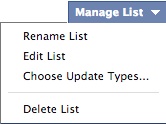
Now before I get into the (recently made much more complicated; /shakes fist angrily at Facebook) details, it’s important to note that Facebook has decided to use their handy algorithms to auto-create a few standard lists for you: “close friends,” “acquaintances,” and lists based on geography and affiliations like universities you’ve attended. You should be able to find these on the left side bar under “Favorites.” If you click on one of these lists, it presents you with a feed of content just from people included in this list. Look on the right side and in the top right of the page is a pulldown menu titled “Manage List.” This gives you three options: (1) Rename the list to something else, (2) edit the people who are on the list (the default popup screen shows people on the list and you can click the “X” in the top right to delete the person; alternatively you can change the view to all your friends and click on friends to add new people to the list; and (3) Choose update types, which allows you to select the type of content that appears in the feed. As an FYI, you can do this on a Friend-by-Friend basis by hovering over a Friend’s name, then hovering over the “Friend” button,  then clicking on “Settings” (not complicated at all, right?!?). I regularly do this for Friends who post game updates, music updates, and other posts too frequently. On the right side of the List page, there is also a useful feature, “List Suggestions,” which may save you the time of scrolling through all your friends to see who should be added to the List (again, algorithm magic is at work here).
manage list

So that helps you with the Lists that Facebook has created for you. But what if you want to create a List from scratch? This has, unfortunately, become a bit more complicated in the last year or so. So follow these instructions and you should be set.

1. First, figure out what List you want to create (is it coworkers? local friends? soccer buddies?). Pick one of the Friends who will be on that List and go to their profile page.

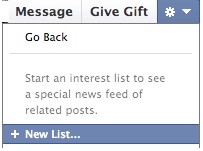
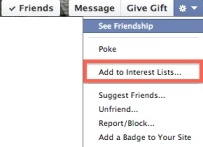
2. On the right side, click on the wheel icon.   You’ll see several options. Click on “Add to Interest Lists.”
interest lists

3. Click “New List.”

new list

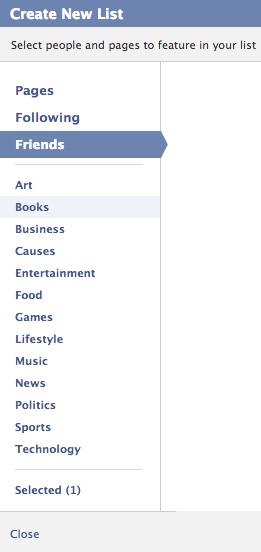
4. You now have a (unnamed) List with exactly one person on it. To add more people, select “Friends” and add additional people to the List. Then click Next. Here you’ll enter a List name (e.g., “Work Friends”), decide the visibility of that List (Public, Friends, or Only You), and create the List (by clicking Done). The visibility component is relatively new and reflects G+ in terms of giving you the option of allowing your Friends to see who else is on a given List.
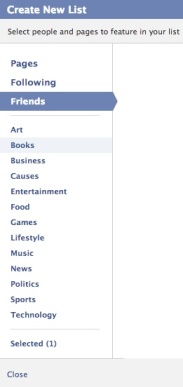
create new list

It is important that when you accept new Friend requests, you remember to add those Friends to any appropriate Lists. Facebook makes this simple: once you “confirm” a Friend request, a button labeled “Add to List” will appear. Click on this and you are presented with a checklist of all your Friend Lists. Remember that you can also add friends to Lists by visiting the List page and adding through the Suggestions (as was noted above.
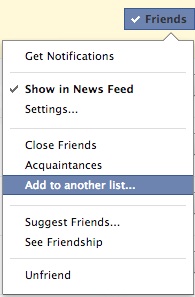
new friend-list

*IMPORTANT* There is another way to create a List that I thought Facebook had gotten rid of and only discovered after creating these new instructions (based on Facebook’s help instructions). It’s buried, as much of the information about Friend Lists are. However, on your home page, if you look on your left sidebar and scroll down, there should be a “Friends” section. If you hover over it, a “More” button should appear. Click that and it should show you all your Friend Lists. In addition, on the page there should be a “+ Create List” option, in which you enter the List name and start adding Friend names. This is the original way you would create Friend Lists.

Posting an update to a list

Now that you have created a Friend List, who do you use them? This is a relatively simple process as well. Return to your homepage or profile page. Click your cursor in the status update box and you will see a pulldown menu immediately to the left of the “Post” button. If you click on this, you will see a number of options, including: Public, Friends, Custom, and Only Me.
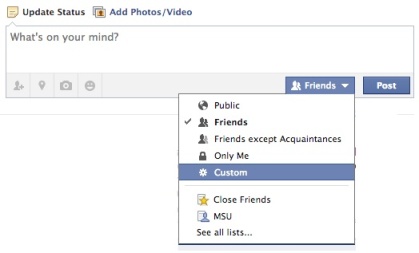
post-friend list

If you select Custom, a pop-up box will appear. Under “Make this visible to,” select “Specific People” from the pulldown menu. A text box will appear and you need merely type in the name of the List you have created. Alternatively, you can select individual people through this option. You can also block access to specific people or groups by entering a List or individual(s) in the “Hide this from” line. Select “Save Changes” and you are ready to post a Custom update!

Another important note is that with this recent change, Facebook also decided that it would retain your setting for all subsequent updates until you change it. So you need to be aware of what your settings are before posting so that you don’t accidentally send a post to the wrong group.

And that, my friends, is how to create and use the Friend Lists feature in Facebook. The existence and use of these kinds of features are central to many of my research questions, so I am always happy to talk about the pros and cons of using them. Feel free to ask questions or post comments below.

August 2011 Update

Just a quick update to note that I successfully defended my comps on August 3 and am officially ABD! Now I’m working on my fall syllabus (I’ll be teaching a 400-level course on social media) and pushing some papers out the door before I start working on my dissertation proposal.

I’m also officially on the job market for next year, so if anyone wants to offer me a job in the DC/Baltimore region, I’d be happy to hear from you!  🙂

Updates Galore

My third year as a PhD student has been, in a word, insane. While I certainly worked a lot during my first and second years, it feels like everything has begun to fall into place during the third. Here’s some things I’ve recently noticed and/or experienced:

  1. I have consumed enough of the extant literature in my little pimple on the face of human knowledge that I am finally feeling comfortable engaging in lively discussions about my research and my field more generally. This was an especially wonderful observation when I realized I no longer had to write out a “script” and pseudo-memorize it when I was giving talks. As outgoing of a person as I am, I generally freak out before speaking in front of a group, be it a classroom of 25 students or a conference room with 100 other academics. It was only at the beginning of this year when I was at the HICSS conference that I had a minor epiphany and realized that I know my research and should be confident in talking about it (and not worry about minor spells of forgetfulness when I get asked a question from left field).
  2. Lecturing in front of students is, in some ways, even scarier, because I’m not talking about my area of expertise. But as my friends who are more experienced in teaching keep reminding me: even if I don’t know everything, I still know more than the students in the class (hopefully). Now that I’m finally getting some experience as an instructor I’m realizing that it’s not quite as terrifying as I originally imagined. It’s still a ton of work, but I think it’s worth it. I can’t deny, however, how much easier it will be when I don’t need to spend hours-days prepping for one lecture.
  3. Academic publishing sucks in many ways. The worst is the publishing cycle. From initial submission to publication, years can go by. Years! When you work in a field that is constantly evolving, this is especially problematic. Imagine people doing cutting edge research on Friendster back in the day and having their amazing study be published and Friendster is already old news. This happens all the time and can be very discouraging. That said, 2011 appears to be the year when everything seems to be falling in place regarding publishing for me. Check out my CV for full details, but I’m especially proud to have three journal articles out or coming out this year, each on very different aspects of communication technology use: (1) Facebook use and political participation; (2) students’ repurposing of Facebook for classroom organizing; and (3) cyberslacking behaviors in the workplace.
  4. While not within reach, my PhD is starting to become visible on the horizon. In just a few weeks, I will begin collecting data for my prelim, which is a large research project I need to perform (in lieu of comps) before I can become ABD (all-but dissertation). For this study, I’m focusing on the role that context collapse (i.e., the flattening of multiple audiences into one) plays in self-presentation on social network sites. I’ll be collecting both quantitative (survey) and qualitative (interview) data for this research and am getting very excited to get this study underway!
  5. On that note, I’ll be talking about the changing roles of audience and self-presentation online at the Theorizing the Web conference in College Park, MD on April 9. I’m looking forward to meeting everyone there and especially chatting with professors who work in the area, since I’ll be moving back to MD in less than a year.
  6. I also received the exciting news earlier this week that I’ve been selected for the Consortium for the Science of Sociotechnical Systems (CSST) Summer Research Institute, being held this June. This is a NSF-sponsored program that pairs advanced doctoral students and pre-tenure faculty with more senior researchers in the field to help grow as socio-technical researchers.

Needless to say, a lot has been going on lately, with even more happening as this year progresses. It’s turning into quite the wild ride, so I’m just trying to hold on and enjoy myself.

Using technology to get answers to your questions: better or just quicker?

In my opinion, one of the most wonderful things about the Internet is the sheer glut of information available. Of course, you (nearly) always have to take a “buyer beware” approach to information you find online, especially when moving beyond organizational websites (and sometimes even when you are on those sites). What makes all of this information even more valuable, however, is the ability to query the system, to ask a question on any conceivable topic and receive feedback from other individuals. Sometimes, on “friend”-based sites such as Facebook, you can pose a query to a given set of people, i.e., your Friend network. In other cases, queries shoot across the intertubes and can be answered by a complete stranger.

Obviously, there are pros and cons to employing technology for your question-based needs. One of the points we stress in our research again and again is that social network sites like Facebook are especially well-suited when it comes to bridging social capital. Social capital(1) is a construct similar to that of other forms of capital (e.g., financial, human) that describes the benefits accrued from one’s social network, and bridging social capital (as coined by Robert Putnam) is concerned with benefits that are found in a diverse network of weak ties, such as access to novel information. Since Facebook opened its network to everyone, we have seen a great diversification of network composition to include family, friends, colleagues, acquaintances, and more. As the average Facebook Friend network includes 130 people (according to Facebook, at least), it is pretty clear that these networks include a number of weak ties who, consequently, are different from us in terms of knowledge, experience, etc. By creating features that allow users to easily communicate with the network, users are able to tap into that diverse knowledge when they have questions, especially when no one within their core of connections has an answer.

Sociologist Mark Granovetter–who is probably cited in just about everything I ever write these days–wrote about the various benefits we receive from different types of network ties and argued that the strength of weak ties is that they can access individuals and networks that we are not immediately connected to by bridging the gaps between networks (what Ron Burt refers to as structural holes). Granovetter applied this to the process of getting a job: within your strong tie network, most of the information is redundant; however, by accessing your weak ties, you are likely to hear about more opportunities.

Search technology has fueled the ability to get answers to questions fast. For example, if I type “How much wood can a woodchuck chuck” into Google, I get 28,000+ results (and learn the answer is about 700 pounds). The benefit to using a search engine such as Google over your online or offline social network can be found in speed and diversity. Oftentimes, you cannot immediately reach a member of your social network (or a known expert on the topic) immediately. Furthermore, no matter how diverse your network is, they probably don’t have an answer for everything (if they do, I’d like to met you).

At the same time, however, there are a number of drawbacks to using more global-based services to find answers to questions. First, as much useful information as the Internet contains, it contains far more worthless–and potentially dangerous–information (boo!). The ease with which content can be posted to the Internet is certainly a two-edged sword; anyone can post to the Internet (yay!) but those people may be ignorant of some of the facts or–worse–malicious in their intent. Sometimes, weeding through all the trash to find an answer is not worth the time or effort. Even more importantly, I feel that we sometimes ignore the fact that humans are extremely complex individuals, and many of the questions we ask cannot be answered by entering some keywords into the searchbar.

This last point reveals one way in which social networks can be more beneficial than search engines. If I pose a question to my Facebook Friends, many of them can incorporate information they already know about me into their response. This is certainly beneficial when I am asking advice-based questions, such as if I should go see a specific movie this weekend, vs. a more fact-based question. So therefore, one could suggest that I use Google for all my objective questions and Facebook for all my subjective questions. However, there is another issue to consider when using a SNS for question asking: in order for me to receive answers from my network, I must make certain disclosures. But what if it’s a sensitive subject (e.g., health-related)? What if is a question about a specific subgroup of my network (e.g., dealing with an annoying coworker) and there are members of the group in my network? I could post these questions to an online discussion forum, shrouded in pseudonumity, but then I run into the same problem of asking more personal questions of people who don’t have the benefit of my background to help them provide the best response.

The main reason I’ve been thinking about this today is because I just received access to the (still in beta) Facebook Questions feature. The basic breakdown is this: you post a question and tag it. Anyone on Facebook (to my knowledge) will be able to view your question and respond to it. Your name does not appear to be listed with your question, although the names of responders are linked to their comments. You also have the ability to send a question to a friend, even if it’s not your question. So basically it’s just like many of the other question-based sites (e.g., WikiAnswers, Yahoo! Questions) but with real identities tied to responses.

I find a few things really interesting about this. First, not identifying the question asker appears to be an attempt to encourage posting of more sensitive questions. Second, identifying responders may be an attempt to legitimize responses and discourage “bad” responses. One thing I’m curious about is if there will be a way to tie the question to your network, so you can pose a question to both your friends (and be identified so they know they’re responding to you) and the 500 million other Facebook users (and remain anonymous). Of course, this could be done by posting the question as a status update and through the feature, but everyone knows that humans are lazy.

So what is the benefit of using Facebook Questions over a Google search? I’m very interested to see if my second point regarding legitimacy actually has an effect on increasing question posters’ trust in responses. I’m also really curious to see what kinds of questions come to dominate Questions, as the feature falls somewhere between asking your network and using a search engine. In addition, will the decision to link real identities to responses discourage some users from posting comments, even when the topic is innocuous? For me personally, I struggle with the idea of having my real name linked to posts that will be forever written in the annals of the Internet. Only recently have I created a public Twitter account attached to my full name, and even now the only place you see my full name on this site is if you download my CV. But maybe I’m hyper-sensitive about this and normal people won’t care (based on some of the things I real on Lamebook and Failbook, it seems that many people don’t care if their friends and everyone else sees all their dirty laundry).

How do you feel about the Questions feature? Would you use it? What kinds of questions do you think are best asked to your online social network? What kinds of questions should never be asked on Facebook?

Note:

(1) For a discussion of different forms of capital, see Bourdieu’s seminal piece [pdf], which was published in “The sociology of economic life” (2001).